What a person has to do, Crew writes down as to-dos, events, expenses, notes and decisions, in the notes beside the chat, one shared copy per group. To-dos have an owner and a due date, and the owner gets a push when it’s due.
Tuesday, November 10
18:00

Kainautsnow
Take out trash
Your turn for the trash, tonightKainauts2h ago
Leo paid the internet bill
$45, split at month endKainauts2h ago
Crew split the internet bill: $15 each
Crew“I’ve got trash this week. Leo pays the internet, we split it at month end” becomes three tasks, each with its own owner and date.
When a to-do is due, the push goes to the person it’s assigned to, so you don’t have to chase them. In a group room, Crew can also remind everyone at once.
Who finished what, and when. No more chasing.
Snap a receipt or just say who paid. Crew logs it as an expense.
Notes and attachments export in full, anytime.
 Reminder: trash goes out tonight at 9 PM
The expenses you log turn into charts and tables on their own: what it went on and each person’s share, without opening a spreadsheet.

Spending charts
Pies by category or member, bars by month or week, and a running total. Pick the period and the people.
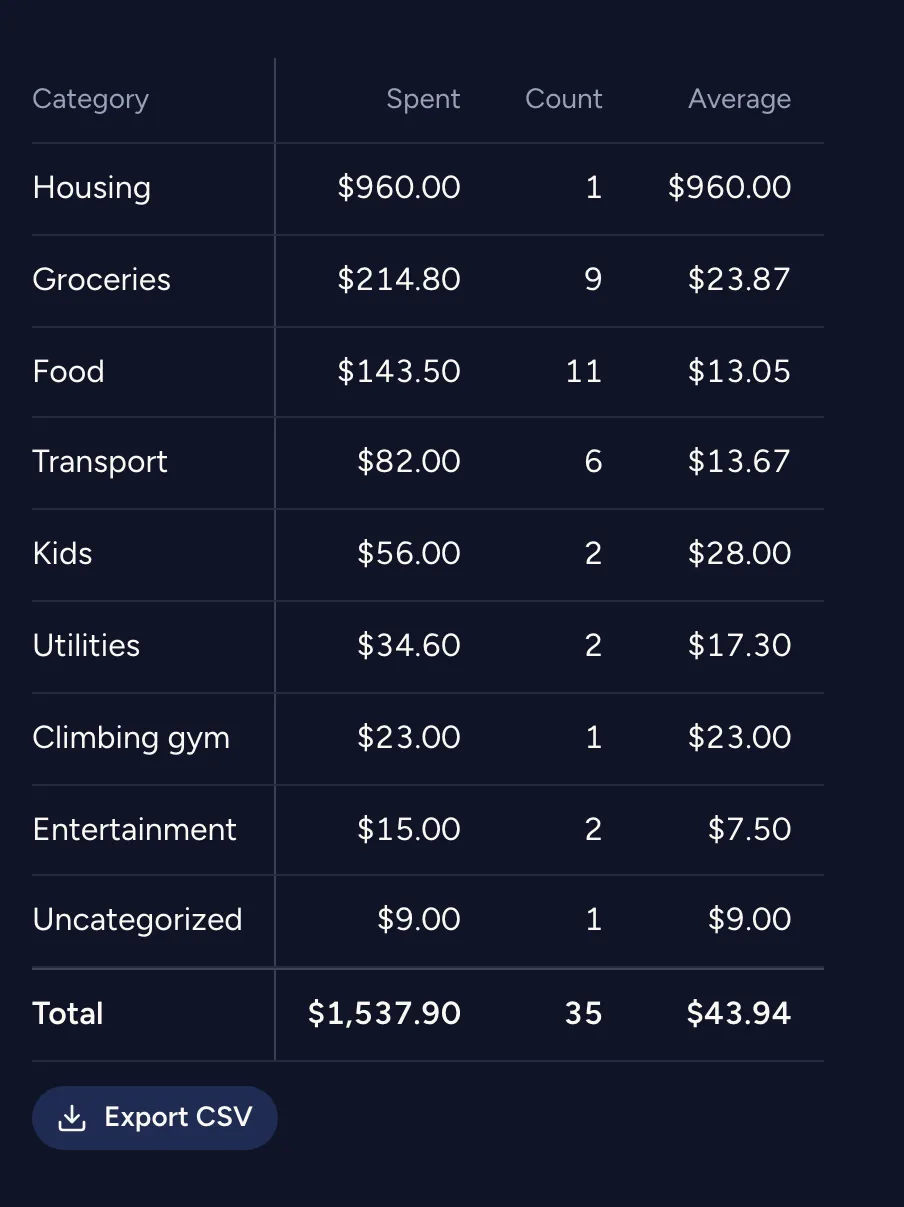
Pivot tablePlus and up
Choose your rows, columns and values (Spent, Count, Average) and it recalculates as you tick. Save the ones you use as views, or export a CSV.
Once you’re in, one link brings your friends aboard.
App StoreComing soonGoogle PlayComing soon
Not available yet in these regions: United Kingdom, Australia, and the European Economic Area (EU, Iceland, Liechtenstein, and Norway).